Live Payload CMS + Next.js examples you can inspect.
Real Payload CMS + Next.js examples, including live demos, admin previews, architecture notes, and implementation patterns.
| Demo | Frontend | Admin | Public login | Status | Best for |
|---|---|---|---|---|---|
| Custom SaaS backend | ✓ | Preview link | ✓ | Complete demo | SaaS / custom product backend |
| Multi-locale | ✓ | Admin link | — | Architecture preview | Multi-market websites |
| Multi-tenant | ✓ | Admin link | — | Architecture preview | SaaS / portals / white-label |
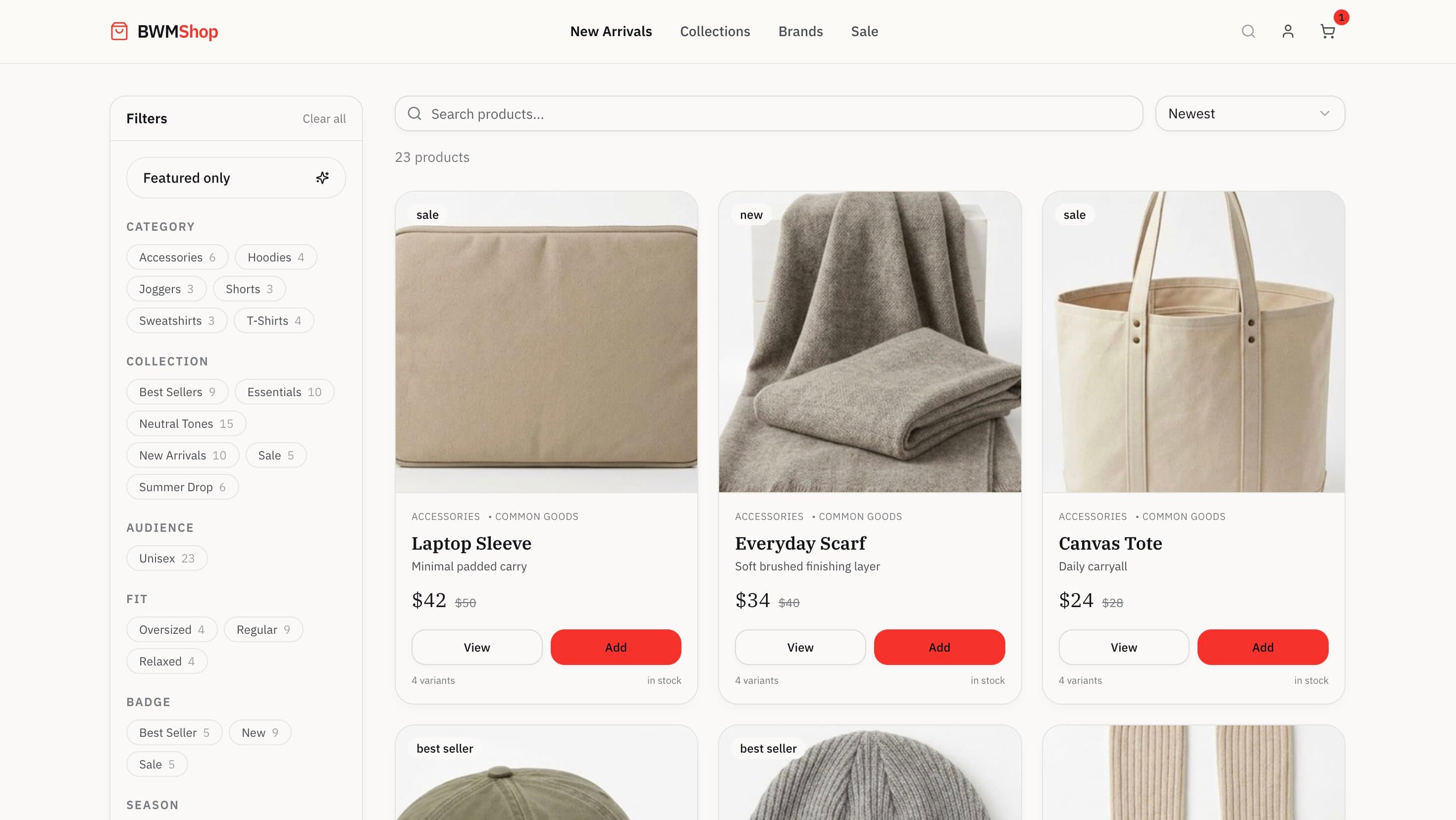
| Ecommerce | ✓ | — | — | Frontend only | Product catalog / storefront ideas |
Demo Library
Payload CMS + Next.js examples you can open and inspect.
Multi-locale for teams serving multiple markets from one codebase. Multi-tenant for teams building platforms where multiple customers or units share one product. Custom SaaS for teams evaluating Payload behind a real creator backend. Ecommerce for teams evaluating Payload as the base for a custom storefront.
Multi-locale
For teams serving multiple languages or markets from one codebase.
View demoMulti-tenant
For teams building platforms where multiple customers share one product.
View demoCustom product backend
For teams evaluating Payload as the backend and admin layer behind a custom product UI.
View demoE-commerce
For teams evaluating Payload as the base for a custom storefront.
View demoMulti-locale
Multi-locale Payload CMS demo
For teams that need one content platform to serve multiple languages or regional markets without duplicating the entire project. Especially relevant if you are replacing a legacy CMS or moving away from fragmented multi-site setups.
Frontend and admin links are available. No public test credentials — this demo is useful as an architecture preview.
What it shows
- Localized fields in Payload
- Locale-aware routing in Next.js
- Translated SEO metadata
- Self-hosted on Hetzner VPS via Docker
What to look at
Open the frontend and switch languages. Then compare the structure in the admin.
Why it matters
Multi-locale content is one of the first places where content modeling decisions become expensive if they are made too casually.
Next.js + Payload CMS advisoryMulti-tenant
Multi-tenant Payload CMS demo
For teams building platforms, client portals, internal tools, or white-label systems where multiple customers or business units share one product.
Frontend and admin links are available. No public test credentials — this demo is useful as an architecture preview.
What it shows
- Tenant-aware collections
- Role-based access control
- Global users with tenant membership
- Deployed on Vercel with Neon managed Postgres
What to look at
Switch between tenants and compare what changes on both the frontend and the admin side.
Why it matters
Multi-tenant projects often fail because teams model users, tenants, and access rules too late or too loosely.
Still deciding whether you need true multi-tenancy? Start with the architecture guide.
Payload CMS auditCustom product backend
Custom SaaS app with Payload + Next.js
Try a real creator backend built on top of Payload. This is not just the native Payload admin. It is a custom multi-tenant, multi-language product interface for managing products, orders, deliveries, payments, and storefront settings, with Payload powering the underlying data and admin layer.
What it shows
- Custom SaaS-style creator backend built with Next.js and Payload CMS
- Multi-tenant architecture with isolated creator-facing workflows
- Multi-language product and storefront operations
- Product, stock, pricing, order, and delivery management workflows
- Storefront settings and creator-facing operational UI
- Self-hosted infrastructure with separate development, staging, and production environments
- Full database isolation for development and staging using ZFS clones
- Self-hosted S3-compatible storage with a proprietary DAM layer and Bunny CDN delivery
- Separate native Payload admin behind the product layer
Best fit
- Marketplace products with seller or creator dashboards
- Operational backends with custom workflows
- Platforms that need strict environment isolation across development stages
- Teams evaluating Payload beyond a website CMS
- Custom SaaS apps with a CMS-backed admin layer
Demo links
Test this demo
Test the custom creator backend
Demo safety note: This account uses seeded demo data only. It has no access to real customers, payments, production integrations, or private uploads.
This demo shows a custom SaaS-style backend built with Next.js and Payload CMS. Creators use this interface to manage products, stock, pricing, orders, deliveries, and storefront settings across a multi-tenant, multi-language, self-hosted setup.
Custom creator backend
https://ankiu.izlozbica.si/en/pisarna/prijavademo@ankiu.local
Password
AnkiuDemo2026!
Native Payload admin
https://ankiu.izlozbica.si/adminWhy both links matter
- The creator backend is the custom product UI.
- The Payload admin is the native CMS/admin layer behind the product.
- This proves Payload can power a custom SaaS app, not only a content website.
What to look at
Log into the custom creator backend and inspect how creator-facing workflows differ from the native Payload admin behind it. Also note that this runs as a multi-tenant, multi-language, self-hosted system with isolated development, staging, and production environments.
Why it matters
Most Payload evaluations stop at the native admin. This demo shows Payload supporting a real custom SaaS product layer on top of a serious self-hosted architecture: isolated environments, ZFS clone-based database separation, and self-hosted S3-compatible asset storage with a proprietary DAM and Bunny CDN delivery.
Payload CMS developerE-commerce
Payload ecommerce showcase
For teams evaluating Payload as the foundation for a content-led storefront, product catalog, or custom ecommerce experience. This demo focuses on frontend behavior — catalog, filters, variants, cart, and checkout flow. Admin walkthrough is coming later.
Frontend only. Admin walkthrough coming later. Useful for inspecting the storefront, product listing, filters, cart flow, and frontend behavior.
What it shows
- Payload ecommerce plugin in a live storefront
- Catalog listing with filterable product discovery
- Variant-aware product modeling
- Cart flow and routed checkout demo
Best fit
- Content-led ecommerce websites
- Branded storefronts that need CMS flexibility
- Custom product catalogs
- Teams evaluating headless commerce architecture
Demo links
What to look at
Browse the catalog, open a few products, test the filters, and walk through the cart and checkout flow.
Why it matters
Ecommerce projects usually become hard when product structure, content structure, and frontend behavior are modeled in separate systems.
Payload CMS developerExplored the demos? Let's talk about yours.
Multi-locale, multi-tenant, custom SaaS, or ecommerce — the architecture decisions look different for each. Want a second opinion before you commit to the stack?
Which demo should you inspect?
Start with the demo that matches your use case.
Building a multilingual website
Start with the multi-locale demo.
Open demoBuilding SaaS, portals, or white-label software
Start with the multi-tenant demo.
Open demoWant to see Payload behind a custom product UI
Start with the custom SaaS backend — it is the most complete demo.
Open demoEvaluating Payload for product catalogs or storefronts
Start with the ecommerce showcase.
Open demoDemo Safety Requirements
Public demo credentials need stronger guardrails than ordinary staging links.
Before publishing demo credentials publicly, confirm the environment is isolated, resettable, and restricted enough that visitors can explore the product without touching real business data or integrations.
- The demo account only sees seeded or fake data
- It cannot access real customers, orders, payments, emails, or uploads
- Destructive actions are blocked or reset automatically
- No production secrets or integrations are exposed
- The demo tenant can be reset safely
- Native Payload admin access is read-only or heavily restricted
If native Payload admin is not safe for public login, still link to it as "Native Payload admin preview" but do not publish credentials for it.
Deployment Options
Not boxed into a single hosting model.
One of Payload's real advantages is deployment flexibility. That changes cost, performance, ownership, and long-term risk.
Edge-first
Cloudflare
For teams that want edge-friendly delivery, strong global performance, and modern platform primitives.
Infrastructure ownership
Docker
For teams that want the most control. Docker Compose plus Nginx gives predictable runtime behavior and fixed monthly cost.
Managed frontend
Vercel
For teams that want fast frontend deployment and managed platform ergonomics. Strong developer experience.
FAQ
Frequently Asked Questions
Can I try a live Payload CMS demo?
Can I access the Payload admin?
Are these official Payload demos?
Can Payload CMS be used for SaaS apps?
Can Payload CMS support multi-tenant apps?
Can Payload CMS support ecommerce?
Can Payload CMS replace WordPress, Sanity, or Contentful?
Can you build a custom Payload CMS demo for our use case?
Are these real production projects?
Can I reuse the patterns?
Need a Payload CMS demo for your own use case?
I can help you design the content model, access control, deployment, and admin workflows before your team commits to the stack.